Hey friends,
If you’re thinking about trying Appy Pie, a no-code AI app builder – make sure you read this review first.
Based on my experience, I’m going to share everything you need to know about Appy Pie – from its pricing and features to building an app….where it does well, and where it falls short.
I’ll also compare it with some of my favorite vibe-coding platforms, such as Lovable and Replit, and see whether Appy Pie is actually worth using or whether you should skip it.
Before I start, let me tell you a little bit about myself in case you don’t know me.
I have been vibe-coding and building apps with AI for almost one and a half years now. I’ve built several apps and websites using no-code and AI platforms such as Lovable, Replit, Bolt, and Emergent.
Some of these apps are live and available to everyone, while most of them I’ve built just for fun, experiment, or my personal use.
This blog is all about sharing my honest reviews of AI app builders that I’ve personally tried and tested, so you know which platforms are actually worth using.
And this time, I decided to try Appy Pie.
So, let’s dive into the Appy Pie review.
TL;DR
Appy Pie is a beginner-friendly no-code AI app builder that can help you create mobile apps without writing code. You can either describe your app idea and let AI build it, or start with templates and customize your app using a drag-and-drop editor.
I found Appy Pie particularly good for business-focused apps such as e-commerce, restaurant, food-ordering, booking and similar apps where templates, images and ready-made features can save you a lot of time.
However, there are a few things you should know before using it.
Appy Pie isn’t exactly free. You get only a 7-day free trial, but you’ll need a paid plan to publish your app. Unlike platforms such as Replit and Lovable, it doesn’t give you daily AI build credits on a free plan that you can keep using to build and experiment.
I also found its AI less impressive when I tried building a simple and highly customized app. The first version looked good, but it didn’t completely follow my idea and felt more like a website than the simple mobile app I wanted.
Another important thing: the Platinum plan is the only Appy Pie plan that currently lets you publish your app to both Google Play Store and Apple App Store. And you still need to pay Google’s and Apple’s separate developer fees.
My verdict: Appy Pie is worth trying if you want to launch a quick app or want to build a business/e-commerce-style app quickly. But for highly customized apps and more freedom to experiment, I’d personally choose Replit or Lovable.
What is Appy Pie?
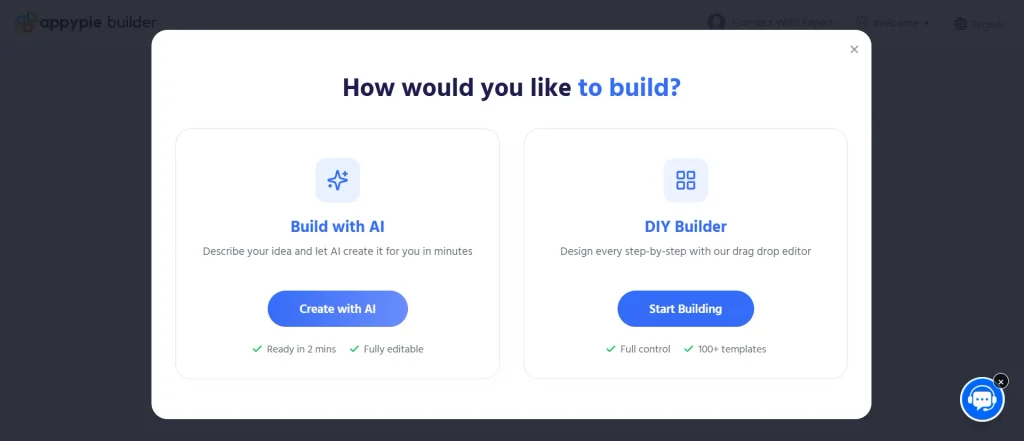
Appy Pie is a no-code platform that helps you build mobile apps and websites without having to write code from scratch.
The platform has been around for years, but it has also added AI-powered app building to its platform.
So today, you have two ways to create an app with Appy Pie.
You can either start with an idea and let AI build the app for you, or you can choose a template and customize it using Appy Pie’s visual drag-and-drop builder.
This makes it suitable for beginners who want to use AI with a no-code approach.
You can build apps for Android and iOS, depending on the plan you choose, and Appy Pie also offers tools for creating websites and business-focused applications.
How Does Appy Pie Actually Work?
The basic idea is pretty simple. You tell Appy Pie what you want to build, and its AI creates a starting version of the app.
You can then preview the app, make changes and customize different parts of it.
If you don’t want to use the AI approach, you can also start with a template and customize it using the visual editor.
So, You have two different ways to build:
- AI app building: Describe your idea → AI creates the app → customize it.
- Template/visual building: Choose a template → customize it → add features → publish it.
I choose the first approach because I just want to test it with a basic prompt.
My Experience Building an App With Appy Pie:
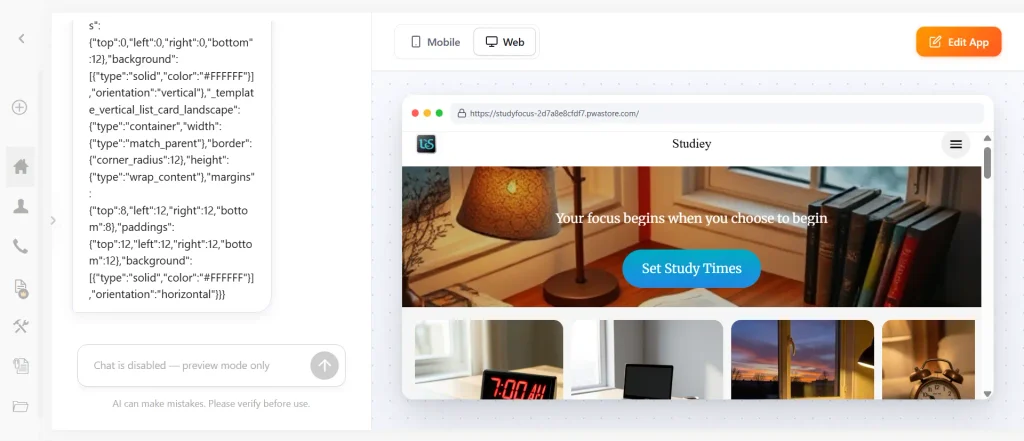
To see what Appy Pie could actually do, I decided to build a simple ‘Study Reminder’ app called Studiey.
I used the 7-day free trial and gave Appy Pie a basic prompt explaining my idea.
Within a few minutes, it created a working version with a clean design and most of the features I had asked for.
However, the first version wasn’t exactly what I wanted.
It felt more like a website than the simple mobile app I had imagined, and it added things like images, subjects and the Pomodoro technique that I hadn’t even asked for.
So I had to make some changes.
Compared with my experience using Replit and Lovable, I felt those platforms understood my prompts better for this particular type of app.
But…that doesn’t mean Appy Pie is bad.
I’d say…Appy Pie seems to make more sense for certain types of apps — like business-focused apps where templates, images, products and ready-made features are essentials.
What You Can Build With Appy Pie?
Appy Pie isn’t limited to one particular type of application.
If you check out the platform, you’ll find…you can use it to create different types of mobile apps and websites, including:
- Ecommerce apps
- Restaurant and food-ordering apps
- Business apps
- Booking and appointment apps
- Education apps
- Social and community apps
- Event apps
- Content-based apps
- Small business apps
- Service-based apps
The exact features available will depend on the type of app and the plan you choose.
This is where I think Appy Pie has an advantage over some of the newer AI coding platforms.
Instead of starting completely from scratch, you can use templates and ready-made functionality for common business use cases.
Mobile Apps and Websites:
One thing I like about Appy Pie is that it isn’t only an app builder. You can also create websites using the platform.
So if you’re a small business owner, you could potentially use Appy Pie to create both a website and a mobile app for your business.
For example, a restaurant could have a website with its menu and information, along with a mobile app where customers can browse food and place orders.
This makes Appy Pie more of an all-in-one platform rather than simply an AI coding tool.
What Types of Apps Can You Create?
Appy Pie is particularly useful when your app has a clear business or service purpose.
For example, you could create an app for:
- Restaurants: Menu, food ordering, delivery and customer notifications.
- Ecommerce: Products, categories, shopping carts and payments.
- Small businesses: Services, contact information, bookings and notifications.
- Education: Courses, learning content and communication.
- Events: Event information, schedules and notifications.
- Bookings: Appointments, reservations and customer management.
You can also create more general-purpose apps, but I’d say Appy Pie’s biggest strength is its collection of business-focused features and templates.
Android vs. iOS App Development:
Appy Pie supports both Android and iOS app development.
However, the plan you choose determines which platforms you can publish your app to.
According to Appy Pie’s current pricing information, the Basic and Gold plans support Android publishing, while the Platinum plan includes iOS publishing as well.
This is useful if you want to reach users on both platforms without building two completely separate apps.
Another advantage for beginners is that you don’t necessarily need to learn Android Studio or Xcode to get started.
Appy Pie handles much of the technical side for you.
Appy Pie Pricing
Pricing is probably one of the first things you should look at before deciding whether Appy Pie is right for you.
Appy Pie currently offers a 7-day free trial (cancel anytime), followed by three paid plans.
At the time of writing, here is what it costs:
| Plan | Annual billing | Main use |
|---|---|---|
| Free Trial (for 7 days) | $0 | Build, edit and preview |
| Basic | $16/month | Android apps |
| Gold | $36/month | More advanced Android apps |
| Platinum | $60/month | Android + iOS |
If you’re from India, the costs:
- Basic plan : INR 6990 /app/year
- Gold plan : INR 9990/app/year
- Platinum : INR 15990/app/year
The exact pricing can vary depending on your country and billing cycle, so I’d recommend checking the pricing page before purchasing.
Note: No matter which pricing plan you choose, you get unlimited bandwidth, hosting, and unlimited app-editing in all of them.
The differences rely on app store (for android or, iOS), number of downloads, and push notifications. So, choose the plan that best matches your requirement.
Is Appy Pie Really Free?
Not exactly. It’s does not offer free AI credits for building your app.
Though you can start for free and it allows you to build your first app with a one time prompt…If you want to edit the app and give your next prompt – you have to either start your 7-day free trial or, purchase a plan.
The free trial lets you build, edit, customize and preview your app. But, publishing a commercial app is still a restriction.
If you want to publish your app to Google Play or the Apple App Store, you’ll need a paid Appy Pie plan.
So I’d look at the free trial as a way to test the platform, rather than a permanent free app-building plan.
For me, this was actually enough to get a good idea of how the platform works.
What Does the Free Trial Include?
The 7-day trial lets you experiment with Appy Pie before spending money that you can cancel anytime even during your trial.
You can start building your app, use the AI builder, make changes and preview the result.
This is particularly useful if you’re not sure whether Appy Pie will work for your idea.
Instead of paying first and discovering that you don’t like the platform, you can test it for seven days.
Just remember that the trial is for personal, non-commercial use and doesn’t provide the same publishing capabilities as the paid plans.
Appy Pie Features
Appy Pie comes with a large collection of features designed mainly around business and mobile applications.
1. Templates and Customization
You don’t have to start every project from a blank screen. Appy Pie provides templates that can give you a starting point for different types of apps.
You can then customize the design, content and functionality based on your needs.
This approach can be especially useful for beginners.
Instead of figuring out how to create every part of an app yourself, you start with something that is already structured.
2. Payments and Ecommerce
If you’re building an ecommerce or business app, payments can be an important requirement.
Appy Pie supports ecommerce-related functionality, allowing businesses to create apps where users can browse products and make purchases.
This is one of the areas where I think Appy Pie is more useful than simply using an AI coding tool.
A business owner doesn’t necessarily want to build every ecommerce feature from scratch.
They want something that works.
3. Bookings and Appointments
Appy Pie also supports booking and appointment-based use cases.
This can be useful for businesses such as: Salons, Clinics, Fitness businesses, Consultants, Hotels, Local services
Instead of relying only on phone calls or WhatsApp, businesses can create an app where customers can interact with their services.
4. Push Notifications
Push notifications are another useful feature for mobile apps.
You can use them to send updates, reminders, promotions and other information to users.
For businesses, this can be useful for bringing customers back to the app.
5. Analytics
App analytics can help you understand how people are using your application.
Depending on the plan and integrations available, you can track things such as user activity and engagement.
This becomes particularly important once you’re building an app for real customers rather than simply experimenting.
6. Other Business Features
Appy Pie also offers several other features and integrations depending on the type of app and plan you’re using.
These can include social features, content management, forms, media, notifications and integrations with external services.
The exact features available can change, so it’s worth checking the current plan details before choosing a subscription.
Appy Pie App Publishing: Google Play and Apple App Store
Building an app is only one part of the process.
Eventually, you’ll probably want to publish it so other people can download and use it.
Appy Pie supports publishing to both Google Play and the Apple App Store, depending on your subscription plan.
However, there are also separate developer fees charged by Google and Apple.
- Google Play currently charges a one-time $25 registration fee for a developer account.
- Apple’s Developer Program costs $99 per year.
These fees are separate from what you pay Appy Pie.
So if you’re calculating the total cost of launching your first app, remember to include these additional expenses.
The Good Things About Appy Pie:
After using the platform, these are the things I liked the most:
- Easy for beginners : You don’t need to know programming to get started.
- AI-powered app building : You can start with an idea instead of building everything manually.
- The template-based approach can save a lot of time for common app types.
- Lots of business features : Payments, bookings, ecommerce, notifications and other features make it useful for businesses.
- Android and iOS support : You can build for both major mobile platforms, depending on your plan.
- Free trial : The 7-day trial gives you a chance to test the platform before paying.
Limitations of Appy Pie:
Of course, Appy Pie isn’t perfect.
And there are a few things you should know before you decide to use it.
AI doesn’t always get everything right. My Studiey experiment is a good example.
The AI created a decent-looking app, but it didn’t completely understand the simple mobile experience I wanted.
You’ll probably need to refine your prompt and make changes after the first generation.
1. Less flexibility than pure vibe coding:
If you’re coming from platforms like Replit or Lovable, Appy Pie can feel more restricted.
You are working within Appy Pie’s ecosystem, templates and available features.
That’s great when those features match your requirements.
But if you have a very specific idea and want complete control over how the app works, a coding-focused AI platform may give you more flexibility.
2. It does not offer any free AI credits:
Like Lovable and Replit that offers daily free AI credits to build your app and even publish it…Appy Pie does not any such function. You just get a 7-fay free trial which might be just enough for testing.
3. Pricing can add up
If you want to publish commercially, you’ll need a paid plan.
And if you want both Android and iOS, you’ll need to choose the appropriate plan. You also need to consider Google and Apple’s developer fees.
So Appy Pie isn’t necessarily the cheapest option for someone who simply wants to experiment with app development.
Is Appy Pie Better Than Lovable and Replit?
This is probably one of the most interesting questions for me because I’ve used all three types of platforms.
And honestly, I don’t think there is one winner….as they are designed with slightly different users and use cases in mind.
Appy Pie:
I would consider Appy Pie if you want to build a business-focused mobile app quickly without worrying too much about the technical side.
It makes particular sense for ecommerce, restaurants, bookings, services and similar apps.
Lovable:
I personally like Lovable when I want to turn an idea into a web application quickly and have more freedom to customize the product.
It’s more suitable when you want to experiment with your own application rather than simply choosing from predefined business use cases. In my view, it’s best if you want a web-app rather than a mobile application.
Replit:
Replit gives you a more coding-focused AI development experience.
You can work with AI to build and modify applications while having much more access to the underlying code.
That makes it more attractive if you want to gradually learn how applications actually work while building them.
So, Which One Should You Choose?
I’d make the decision based on the type of app you want to build.
Choose Appy Pie if:
- You’re building a business or ecommerce app.
- You need features like bookings, payments or notifications.
- You prefer templates and visual customization.
- You want Android and iOS publishing options.
Choose Lovable if:
- You want to build web apps.
- You want more freedom to customize your idea.
- You prefer a more AI-first development workflow.
Choose Replit if:
- You want more control over the code.
- You want to learn while building.
- You’re interested in more customized applications.
- You don’t mind dealing with some technical concepts.
My Final Verdict: Is Appy Pie Worth It?
After trying Appy Pie myself, I think it’s a good option for a specific type of user.
I wouldn’t choose it simply because it says it can “build an app with AI.”
There are now many platforms that can do that.
I’d choose Appy Pie when I want a simple way to build and launch a business-focused mobile app without dealing with much code.
If you’re building a restaurant app, ecommerce app, booking app, local business app or another app where templates, images and ready-made business features are important, Appy Pie makes a lot of sense.
For highly customized apps and experiments like my Studiey app, I’d personally lean more towards Replit or Emergent platforms.
The good thing is that you don’t have to make that decision immediately.
You can start with the 7-day free trial, build your idea and see whether Appy Pie can actually create what you have in mind.
And that’s what I’d recommend doing before paying for a plan.
Try it first. Build something. Test it. And then decide whether it’s worth paying for.