I have been using Hostinger hosting for almost five years now. Recently, I also tried Hostinger Horizons to build multiple custom websites and even a Habit tracker app…all by chatting with AI.
In this article, I’ll share – what Hostinger Horizons is, how much does it cost, things you can build, pros and cons and everything you need to know before you even start using it.
Whether you want to build a personal portfolio, business website, blogs, online store, or just curious in vibe coding, this guide will help you decide if Hostinger Horizons is the right AI builder for your needs.
Ready? Let’s dive into it…
Quick Summary
| Item | Details |
|---|---|
| Product | Hostinger Horizons |
| Best For | Beginners, small businesses |
| Starting Price | $6.99 per month or, ₹679 per month |
| Free Trial | Yes (5 AI credits) |
| Hosting Included | Yes |
| AI Website Generation | Yes |
| Coding Required | No |
| SEO Tools | Yes |
| Domain | Depends on the plan you choose |
| Overall Rating | 4.6/5 |
What is Hostinger Horizons?
Hostinger Horizons is a AI-platform by Hostinger that lets you build browser-based applications or web apps by just chatting with AI.
Simply describe what you want to build and AI will take care of everything…it writes the code, build the backend, project structure to bring your idea to life.
Unlike many traditional website builders that rely on just templates and drag-and-drop editors, Hostinger Horizons follows a conversational approach.
You interact with the AI through a chat interface, explain your requirements, and refine your project with the follow-up prompts.
The best part? You can also upload reference images, use voice prompts, visually edit specific elements, or manually modify the generated code whenever needed.
With Hostinger Horizons, you can build different browser-based applications such as dashboards, habit trackers, budgeting tools, quiz platforms, project management systems, booking websites, customer portals, and other interactive web applications.
How its different from other AI builders?
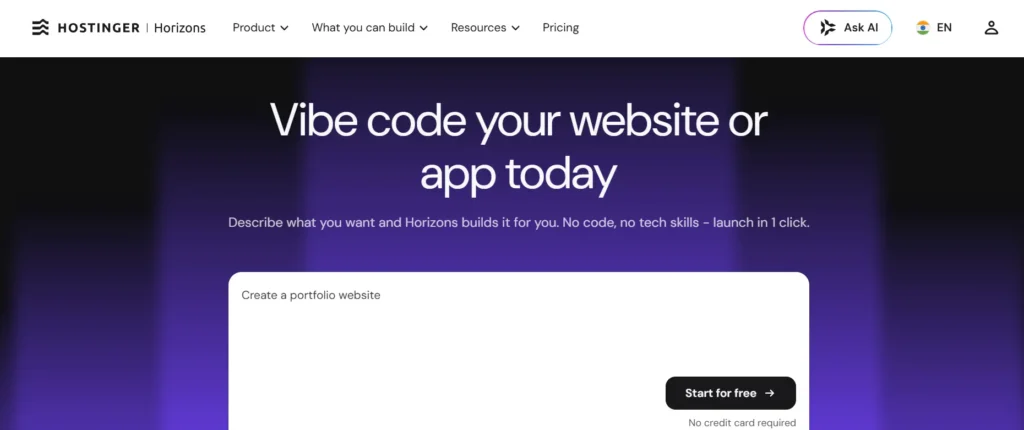
When using, you’ll find Hostinger Horizons is more like a vibe coding tool similar to Lovable, Bolt and Replit – the only difference is that…it can not build mobile apps, browser extensions and 3D games.
Its biggest advantages is that it combines AI development and website hosting both…in a single platform.
Hostinger automatically handles hosting, deployment, SSL certificates, and custom domain connections, so you don’t need separate services to publish your project.
By default, the AI typically uses modern web technologies such as React, Vite, and Node.js, while advanced users can request a different tech stack if needed.
Whether you’re a beginner building your first web-application or a developer looking to speed up your workflow, Hostinger Horizons makes AI development faster, simpler, and more accessible with the help of AI.
What Can You Build with It:
One misconception that most people have that Hostinger Horizons is just good at building AI powered websites or blogs.
However, It can build complete browser-based web apps, business tools, and interactive software using simple natural language prompts.
Whether you’re starting a personal project or building a product for customers, the platform can handle a wide variety of use cases.
Here are some of the most common things you can build with Hostinger Horizons:
Professional Websites
With Horizons, you can create professional websites for almost any purpose. You can build business websites, personal portfolios, agency websites, startup landing pages, event websites, restaurant websites, blogs, and online resumes.
The AI generates responsive layouts, content, navigation menus, contact forms, and other essential pages in just a few minutes. You just to tell your ideas to refine it further.
Online Stores
If you want to sell products online, Hostinger Horizons can also help you build an eCommerce website…which was earlier very difficult unless you know Shopify.
Since it’s integrated with Hostinger’s ecosystem, you can manage your online store, customize product pages, and publish your website without relying on multiple platforms.
Productivity Tools
With Hostinger Horizons, you can also build some best productivity tools like – habit trackers, to-do list apps, project management tools, time trackers, budgeting calculators, savings planners, brainstorming boards, and others.
Whether you want to make it for personal use or business use – both can be possible.
Dashboards and Internal Tools
Need a custom dashboard instead of a standard website? Hostinger Horizons can generate interactive dashboards for tracking finances, monitoring projects, visualizing business metrics, or managing customer information.
These tools can especially useful for freelancers, startups, and small businesses that need lightweight internal software that help them gather useful data and insights.
Learning and Interactive Apps
Horizons can also build educational and entertainment web-apps. You can create quiz platforms, flashcard apps, gamified learning tools, simple browser games, calculators, booking systems, customer portals, and other interactive app without writing code.
In short, Hostinger Horizons isn’t just limited to creating static web pages. It can generate complete web experiences—from simple landing pages to functional browser-based applications—all from a conversation with AI.
What You Can’t Build With Hostinger Horizons:
Hostinger Horizons is a powerful AI development tool, but it isn’t designed to build every type of software.
While it can generate websites and browser-based web applications, there are certain projects that require specialized frameworks, platform-specific tools, or stricter security requirements.
Here are the main limitations you should know before getting started:
Native iOS and Android Apps
Hostinger Horizons cannot create native mobile applications for the Apple App Store or Google Play Store. If you want to build an iPhone or Android app that can be installed directly on a mobile device, you’ll need native app development tools such as Swift, Kotlin, Flutter, or React Native.
That said, you can still build responsive web applications that work well on mobile browsers and behave similarly to mobile apps.
Browser Extensions
Hostinger Horizons also does not support building browser extensions for Google Chrome, Microsoft Edge, Mozilla Firefox, or other browsers.
It may be because…browser extensions require specific APIs, permissions, and packaging formats that are outside the platform’s current capabilities.
If your goal is to create a Chrome extension or Firefox add-on, you’ll need to use dedicated browser extension development tools.
Banking and Financial Applications
Hostinger Horizons is not intended for building banking platforms or other highly regulated financial applications.
Software that manages bank accounts, payment processing, financial transactions, or sensitive customer data must comply with strict security, privacy, and regulatory standards that go beyond the scope of AI-generated web applications.
For these types of projects, professional software engineering and security audits are essential.
Trading Platforms
You cannot use Hostinger Horizons to build online trading platforms for stocks, cryptocurrencies, forex, or other financial markets.
These applications require real-time market data, secure order execution, regulatory compliance, and advanced backend infrastructure that the platform is not designed to provide.
3D Games
Hostinger Horizons is also not built for creating 3D browser games or high-performance gaming experiences.
Modern 3D games often rely on specialized game engines such as Unity or Unreal Engine, along with advanced graphics rendering and physics systems.
However, you can still create simple browser-based experiences, including quizzes, educational games, and classic 2D games like Snake or Tetris.
Should these limitations really matter for you?
Well, for most users, probably not. If your goal is to build a business website, portfolio, dashboard, online store, internal tool, booking system, or browser-based web application, Hostinger Horizons has everything you need…and it can be a great start too.
What I’ve Built with Hostinger Horizons:
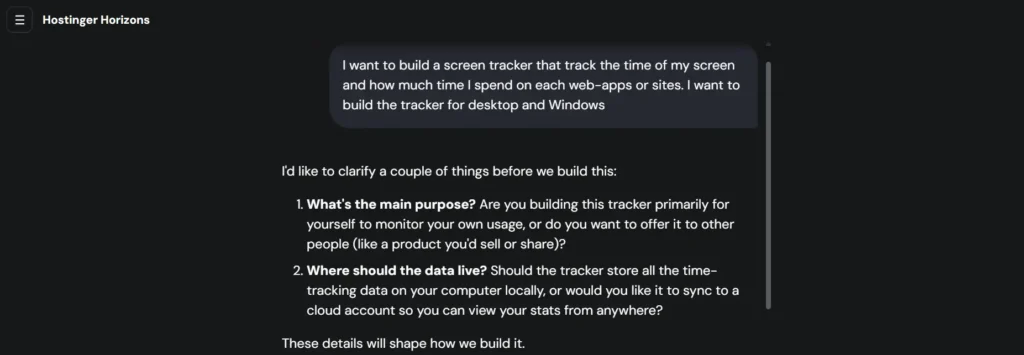
I’ve been using Hostinger for almost five years to host my websites and blogs. So, when Hostinger Horizons was added to my hPanel, I didn’t have to sign up for another platform or connect a separate hosting account. Everything was already available inside my existing Hostinger dashboard.
Even better, Hostinger gives every user 5 free AI credits to try Horizons. That was enough for me to explore the platform and see what it could actually build.
My First Experience with Horizons
When Hostinger Horizons first launched, it was primarily introduced as an AI website builder. Naturally, the first thing I did was create a few websites with it.
The websites looked decent, but I never published them. They remained drafts in my hPanel…because I wasn’t seriously planning to launch them.
At that time, I also found myself more comfortable using WordPress with themes like Astra, GeneratePress, and OceanWP, which I had been using for years.
So while the AI-generated websites were impressive, I didn’t spend much time editing or improving them.
Building My First Web App
A few months later, I decided to give Hostinger Horizons another try.
By then, the platform had evolved from being just an AI website builder into a much more capable AI development platform for building browser-based web applications.
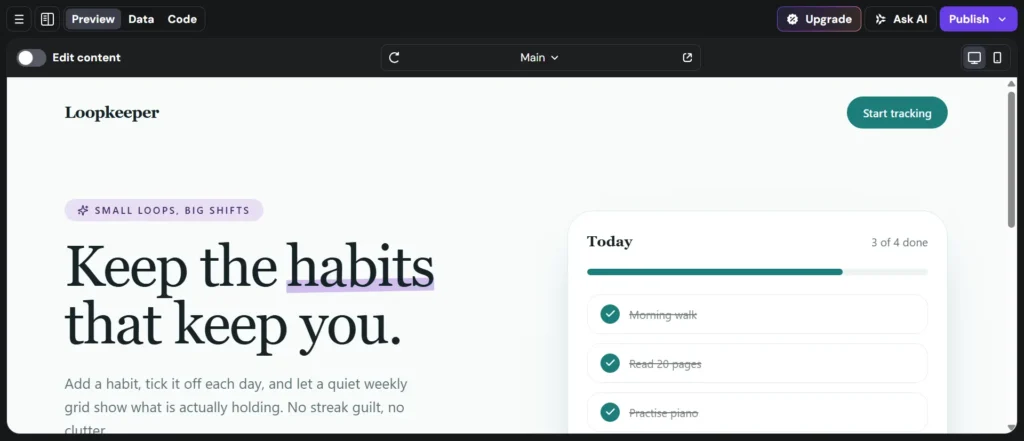
Instead of creating another website, I chose to build a Habit Tracker.
Honestly, I was surprised by how simple the entire process was. I didn’t write a single line of code. I simply described what I wanted, and Horizons generated a functional web application within minutes.
Hostinger – Habit Tracker Guide
Hostinger has already published a step-by-step guide for building a Habit Tracker with Horizons. Since I mainly wanted to test the platform, I followed the same guide and used the recommended prompts.
The result actually exceeded my expectations.
The Habit Tracker I generated looked more polished than the example shown in the guide. Most of the core functionality—including user registration, login, account creation, navigation, and the overall interface—was generated from the very first prompt.
Even the branding, headings, buttons, spacing, and overall design looked clean enough that I barely needed to change anything.
Making Small Improvements
The only feature missing in my tracker was…a collection of predefined habit templates which also shown in the guide itself.
So I simply asked Horizons to add a list of common healthy habits that users could choose from.
Within a few seconds, the AI updated the application and added the feature exactly as I requested.
This experience really demonstrated the biggest advantage of vibe coding. Instead of manually editing files or writing new code, I simply described the feature in plain English, and the AI implemented it.
Publishing the App
Once I was satisfied with the result, I published the Habit Tracker. The tracker is live now…hosted on Hostinger hosting with default url.
The tool worked smoothly, and during my testing I didn’t encounter any major bugs or code errors. Considering that the entire project was built through simple language prompts, I found the overall experience surprisingly reliable.
If you’re curious to see what Hostinger Horizons can generate, you can also try the Habit Tracker yourself.
Will I Upgrade to a Paid Plan?
At the moment, No.
This isn’t because I think Hostinger Horizons is expensive or not worth paying for. In fact, I find its plan affordable compared to other AI development platforms like Lovable.
My decision comes down to how often I would actually use it.
The first reason is time. I currently manage multiple blogs, publish content regularly, maintain two newsletters, create social media content, and test new AI tools almost every day.
Since I don’t build new web applications frequently, paying for a monthly subscription doesn’t make much sense for my workflow.
The second reason is that I occasionally experiment with other vibe coding platforms. For example, Lovable offers a free plan with daily build credits, which is enough for the small number of personal projects I create each month.
My Recommendation
Although I’m not upgrading right now, I genuinely enjoyed using Hostinger Horizons.
If you’re only experimenting with AI app development, the free credits are enough to understand how the platform works.
However, if you plan to build multiple websites, internal tools, client projects, or production-ready web applications, I think the paid plans offer excellent value.
Based on my own experience building and using the Habit Tracker, I found Hostinger Horizons to be fast, beginner-friendly, and capable of generating functional web apps with very little manual effort.
How Much Does Hostinger Horizons Cost?
If you’re thinking about Hostinger pricing and plans…let me explain you:
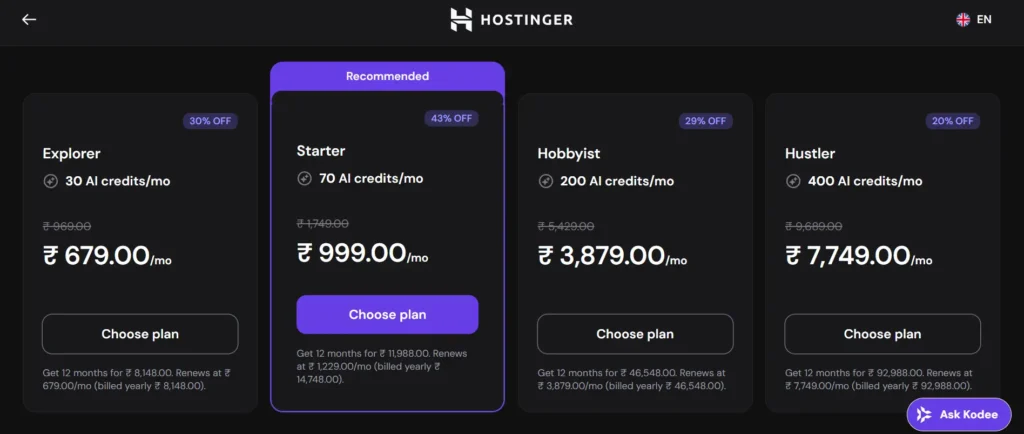
Hostinger Horizons offers five plans, ranging from a free trial for beginners to high-credit plans for professionals building multiple web applications.
The main difference between each plan is the number of monthly AI credits, website limits, collaboration features, and advanced development tools.
Here’s a quick overview of all the available plans.
| Plan | Monthly Price | AI Credits | Best for |
|---|---|---|---|
| Free | ₹0/month | 5 credits | Trying Hostinger Horizons |
| Explorer | ₹679/month $6.99/month | 30 credits/month | Beginners and personal projects |
| Starter | ₹999/month $13.99/month | 70 credits/month | Freelancers, creators, and small businesses |
| Hobbyist | ₹3,879/month $39.99/month | 200 credits/month | Power users and multiple projects |
| Hustler | ₹7,749/month $79.99/month | 400 credits/month | Agencies and heavy AI users |
Note: Prices above shown are based on the annual billing displayed at the time of writing and may change over time.)
Let’s get a bit deeper into each plan:
1. Free Plan
The Free plan is the easiest way to try Hostinger Horizons before spending any money. However, this is only offered to Hostinger users.
It includes 5 free AI credits, allowing you to create and test one website or web application without entering your credit card details.
With the free plan, you can:
- Create one published project
- Get 5 AI credits
- Upgrade anytime when you’re ready to publish
It’s perfect if you simply want to explore the platform, learn how vibe coding works, or test whether Hostinger Horizons fits your workflow.
2. Explorer Plan – $6.99/month (India – ₹679/month)
The Explorer plan is the first paid plan and is designed for users building their first real project.
It includes 30 AI credits every month, which is enough for experimenting with prompts, refining your application, and publishing more than just a production website.
Besides AI credits, you also get:
- Hosting for one website
- One email mailbox
- User accounts and login functionality
- Project version history
- SEO-optimized projects
- Better visibility for AI search tools
- Text-based prompting
- Basic customer support
If you’re creating your first SaaS MVP, portfolio, internal tool, or business website, this plan offers a good balance between price and features.
3. Starter Plan – $13.99/month or, ₹999/month
The Starter plan is Hostinger’s recommended and most popular option.
For only a small increase in price over the Explorer plan, your monthly AI credits jump from 30 to 70, making it a much better value if you plan to build projects regularly.
Everything included in Explorer remains available, plus you’ll get:
- Up to 25 websites
- Free domain for the first year
- Priority customer support
- Sell subscriptions & digital products
- Add AI chatbots and other AI features
- Prompt using images and voice
- Free AI chat mode for guidance
- Purchase additional AI credits anytime
- Collaboration features for teams
For most freelancers, creators, agencies, and small businesses, this is the plan I’d recommend because it unlocks almost every feature most users need.
4. Hobbyist Plan – $39.99/month or, ₹3,879/month
The Hobbyist plan targets users managing multiple projects or building applications frequently.
It increases your monthly allowance to 200 AI credits, making it suitable for heavy AI usage.
In addition to everything available in the Starter plan, it includes:
- Up to 50 websites
- Five email mailboxes per website
- Built-in code editor
- Duplicate projects and reuse them as templates
If you’re building client websites, launching several products, or frequently iterating on AI-generated applications, the additional credits and developer features become valuable.
5. Hustler Plan – $79.99/month (India – ₹7,749/month)
The Hustler plan is the highest Hostinger Horizons tier.
It provides 400 AI credits every month, making it suitable for agencies, development teams, and businesses building multiple AI-powered projects simultaneously.
This plan is ideal if AI-assisted development is part of your daily workflow and you regularly generate new applications, prototypes, or client projects.
What if you need more credits?
Well, Hostinger Horizons offers different pricing model – based on the AI credits you can own.
That means…If you run out of monthly AI credits, you don’t need to upgrade your entire subscription.
Current top-up options include:
| AI Credits | Price in India |
|---|---|
| 10 Credits | ₹489 |
| 20 Credits | ₹879 |
| 50 Credits | ₹1,939 |
| 100 Credits | ₹3,489 |
| 500 Credits | ₹16,459 |
This flexibility can be useful if you only need extra credits occasionally instead of moving to a higher monthly plan.
Which Hostinger Horizons Plan Should You Choose?
Here’s my recommendation based on different use cases:
- Free – Best if you simply want to explore Hostinger Horizons before spending money.
- Explorer – Ideal for beginners building their first website or web application.
- Starter – The best value for freelancers, creators, startups, and small businesses. This is the plan I’d recommend for most people.
- Hobbyist – Great for power users managing multiple websites or client projects.
- Hustler – Best suited for agencies, teams, and professionals who rely heavily on AI-assisted development every day.
Unless you’re building web applications regularly, I’d suggest starting with the Free or Starter plan. You can always purchase additional AI credits or upgrade later as your projects grow.
What I Most Like about Hostinger Horizons
After spending time building blogs and a Habit Tracker with Hostinger Horizons, here are the things that impressed me the most.
1. It’s Not Just an AI Website Builder
One of the biggest things I like about Hostinger Horizons is that…it’s not limited to generating simple websites. It can build complete browser-based web apps with frontend, backend, authentication, and interactive features.
During my testing, I created a Habit Tracker without writing any code. Instead of dragging elements around or installing plugins, I simply described the features I wanted, and the AI generated them.
This makes Horizons useful for much more than portfolios or landing pages. Whether you want to build dashboards, productivity tools, booking systems, or startup MVPs, the platform gives you a solid foundation in just a few prompts
2. Everything Is Under One Roof
Unlike many AI coding tools, Hostinger Horizons doesn’t stop after generating code.
It also handles hosting, deployment, SSL certificates, domains, analytics, and website management from the same dashboard.
Since I’ve already been using Hostinger hosting for years, Horizons was available directly inside my hPanel without requiring another account or setup process.
I didn’t have to copy code into another hosting service or configure servers manually. That seamless workflow saves time, especially for beginners who simply want to build something and publish it without dealing with technical infrastructure.
3. The AI Understands Follow-Up Prompts Surprisingly Well
This is what I notice when building the Habit tracker web-app. Many AI website builders struggle when you ask them to modify an existing project.Hostinger Horizons handled iterative changes much better than I expected.
After creating my Habit Tracker, I wanted to add predefined habit templates. Instead of editing code manually, I simply described the feature, and the AI implemented it correctly within seconds.
It remembered the existing design and integrated the new functionality naturally. That conversational workflow feels much closer to collaborating with a developer than repeatedly generating static websites from scratch.
4. Beginner-Friendly Without Feeling Restrictive
If you’ve never coded before or, tried vibe-copding in actual use…then you will find Hostinger Horizons most beginner-friendly. Without learning HTML, CSS, JavaScript, React, or Node.js, you can still create useful projects through natural language prompts.
At the same time, advanced users aren’t locked into a visual builder. They can inspect the generated code, edit files manually, change the technology stack, and continue building from there. That combination makes Horizons suitable for a wide range of users instead of targeting only non-technical beginners.
5. Affordable Pricing and Plans
I also think Hostinger has priced Horizons quite competitively. The free plan lets you test the platform with five AI credits, while the paid plans offer a reasonable number of monthly credits without becoming overly expensive.
I especially like that Hostinger lets you purchase additional AI credits separately instead of forcing you to upgrade to a higher subscription immediately.
This flexibility is useful if you only build projects occasionally. Compared to many other vibe coding platforms, the pricing feels balanced and accessible for freelancers, creators, and small businesses.
Limitations of Hostinger Horizons
1. AI Credits Can Run Out Quickly
The biggest limitation of Hostinger Horizons is its AI credit system. Every meaningful interaction with the AI takes credits, especially when you’re generating new features, redesigning pages, or fixing mistakes.
If you’re experimenting frequently or repeatedly refining your application, your monthly allowance can disappear faster than expected.
While additional credits can be purchased separately, it’s still something to keep in mind before starting a large project. Writing clear prompts from the beginning helps reduce unnecessary generations and makes better use of your available credits.
2. Free plan is Limited Only to Hostinger User with One Time Credit Only
As mentioned earlier..Hostinger Horizons free plan is only accessible if you are using Hostinger’s hosting. If you’re not an active Hostinger user, you may not be able to use the free plan.
Furthermore, the free plan on Horizons only offers a one time 5 AI credits…whereas on Lovable, you get free credits daily…which certainly gives you more time to explore the platform and experiment with your ideas on vibe coding.
3. It’s Not Suitable for Every Type of Project
Although Hostinger Horizons can build impressive websites and browser-based applications, it’s not designed for every software project.
It currently cannot create native iOS or Android applications, browser extensions, banking platforms, trading systems, or complex 3D games.
If your project depends on platform-specific APIs, enterprise-grade security, or advanced graphics engines, you’ll need specialized development tools instead. Horizons works best for web-based applications rather than every type of software development.
4. AI Still Needs Human Guidance
Hostinger Horizons is powerful, but it’s not a replacement for thoughtful planning. The quality of the generated project depends heavily on the prompts you provide.
For example, when I generated blogs with Horizons, I could not find the design as compatible as WordPress themes and templates I design.
In my view, like every AI development tool I’ve tested, Horizons works best when you treat it as a collaborative assistant rather than expecting perfect output on the first attempt.
5. Advanced Projects May Still Require Coding Knowledge
While beginners can build surprisingly capable applications without writing code, more complex projects may eventually require some technical understanding.
If you want to integrate external APIs, customize backend logic, optimize performance, or troubleshoot unexpected issues, knowing basic web development concepts becomes helpful.
Horizons significantly reduces the amount of coding required, but it doesn’t eliminate technical complexity for advanced applications. For simple websites and productivity tools, this won’t be an issue, but larger projects may still benefit from developer experience.
Final Verdict- Is Hostinger Horizons Really Worth the Investment in 2026?
After spending time with Hostinger Horizons, building multiple websites, and creating a fully functional Habit Tracker, I can confidently say that Hostinger Horizons is one of the most beginner-friendly AI development platforms available in 2026.
What impressed me the most wasn’t just its ability to generate a website from a prompt. It was…how easily I could continue improving my project through conversation. Whenever I wanted to add a new feature, refine the design, or modify the functionality, I simply described what I wanted, and the AI handled most of the work.
Another reason I like Hostinger Horizons is its all-in-one approach. Unlike many AI coding platforms that only generate the beautiful draft designs, Horizons also takes care of hosting, deployment, SSL, domains, and website management. It makes the entire experience much simpler, especially if you’re already using Hostinger.
That said, it isn’t the perfect platform for everyone.
If your goal is to build native mobile apps, browser extensions, enterprise software, trading platforms, or graphics-intensive 3D games, you’ll quickly run into its limitations.
Likewise, if you only build one or two small personal projects each month, a free AI coding platform may be sufficient.
Personally, I’m not upgrading to a paid plan right now, but that’s because of my workflow—not because the product isn’t worth it.
As said earlier, I already manage multiple blogs, publish newsletters, create content almost every day, and regularly test new AI tools. I simply wouldn’t use Hostinger Horizons often enough each month to justify another subscription.
However, if I were building client websites, startup MVPs, SaaS prototypes, internal business tools, or browser-based applications on a regular basis, I wouldn’t hesitate to subscribe to one of its paid plans.
Now, It’s your turn:
Got some thoughts or questions about Hostinger Horizons or AI website builders in general? Feel free to ask in the comments.