When people ask me which AI tool I use for my research work, my answer is usually Perplexity AI.
Over the past year, I’ve used it almost every single day…not just to answer random questions, but to research AI tools, verify facts, compare products, summarize long articles, find reliable sources, and speed up my content creation workflow.
I remember, when it launched, I thought it as “just another ChatGPT alternative.”
But… after using it consistently, I realized it serves a complete different purpose. Instead of replacing search engines or chatbots entirely, it combines conversational AI with real-time web search and source citations, which makes it one of the fastest ways to find trustworthy information online.
I’m not saying…it’s perfect or doesn’t hallucinate.
I’ve come across plenty of situations where Perplexity saved me hours of research, but I’ve also noticed its inaccurate answers, weak sources, and limitations that made me switch back traditional Google Search many times.
Overall, those experiences completely changed how and when…I use Perplexity.
In this review, I’m not going to repeat the features you’ll find on Perplexity’s homepage. Instead, I’ll share my genuine experience after using it for a year: what impressed me, what frustrated me, where it outperformed other AI tools, where it fell short, and whether I think it’s worth using (or paying for) in 2026.
Trust me, if you’re wondering whether Perplexity AI deserves a place in your workflow, this review can help you make a informed decision before investing your valuable time…or money.
Quick Verdict:
| Category | My Verdict |
|---|---|
| Overall Rating | 8.5/10 |
| Best For | Research, learning, web search, source citations, and planning projects |
| Worst For | Creative writing, complex coding projects, and advanced image generation |
| Free Plan | Yes – great enough for most casual users |
| Pricing | Free plan available. Perplexity Pro: Starts at $17/month |
| My Recommendation | for students, professionals, researchers, marketers, bloggers, and anyone who spends hours searching the web. |
| Would I Pay Again? | Yes. The time it saves on research alone makes the Pro subscription worthwhile for my workflow. |
What Is Perplexity AI and How I Use It?
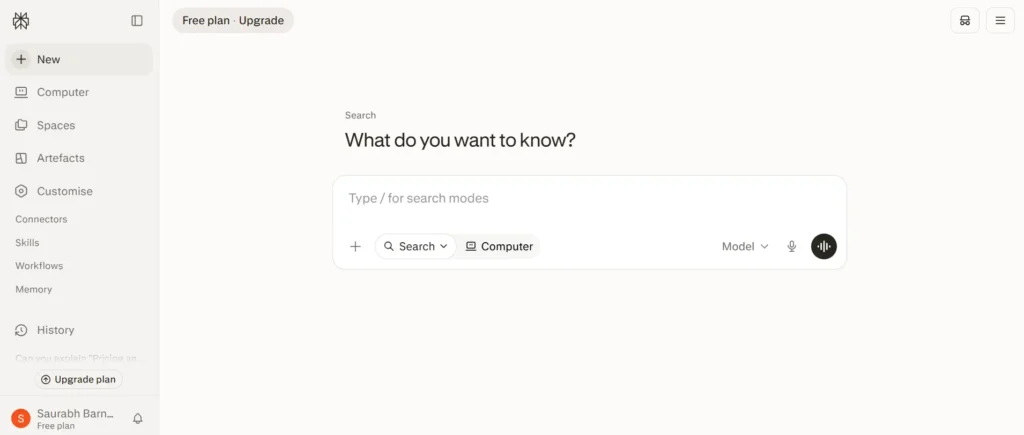
Before I started using Perplexity, my research process was somewhat scattered. I’d search on Google, open a dozen tabs, skim through articles, verify facts from multiple websites, and then switch to ChatGPT to summarize everything.
It worked, but it was slow, repetitive, and often overwhelming – especially when researching AI tools, software, and rapidly changing topics.
However, when I first tried Perplexity, I thought it’s simply another AI chatbot competing with ChatGPT. But after spending some time with it, I realized Perplexity is built with a different purpose.
Rather than focusing primarily on conversations or content generation, Perplexity acts as an AI-powered search and research assistant that combines real-time web search with concise answers and clickable source citations.
As someone who runs an AI tools blog and regularly researches new platforms, updates, pricing changes, comparisons, and product features, that sounded exactly the workflow I needed.
Over the past year, Perplexity has become one of the first tools I open whenever I need to:
- Research AI tools and software
- Verify facts before publishing content
- Compare products and services
- Find reliable sources without opening dozens of browser tabs
I’ve used it almost daily and have tested it across hundreds of searches – from AI tools and coding questions to productivity tips, travel planning, product comparisons, and general knowledge.
Some answers impressed me enough that they saved hours of research, while others reminded me that AI isn’t always right and better to verify first before using it.
That’s exactly why I wanted to write this review.
If you’re considering Perplexity AI, my goal is to help you understand not just what it can do, but how it performs when you rely on it regularly.
My Experience After Using Perplexity AI for a Year
I’ve tried dozens of AI tools over the past few years, but very few have become part of my daily workflow. Perplexity AI is one of those rare exceptions.
I don’t take it as a replacement for Google or ChatGPT, I use it as the first step in my research process.
Whenever I need accurate, up-to-date information, I always start with Perplexity because it gives me a concise answer along with links to the sources it used. That alone saves me from opening multiple browser tabs just to understand a topic.
Over the past year, I’ve used Perplexity AI for hundreds of searches across a wide variety of tasks. Some days, I might ask only a few questions, while on busy research days, I’ve relied on it dozens of times.
Here are the primary ways I’ve incorporated it into my workflow:
1. Daily Research
This is where Perplexity has been the most valuable.
Since my blog is focused on AI tools, I constantly have to research new products, feature updates, pricing changes, company announcements, and industry trends.
Instead of manually searching multiple websites, I ask Perplexity to summarize the latest information and provide source citations.
For example, if I want to know whether an AI tool has launched a new feature or changed its pricing, Perplexity usually finds the relevant information within seconds. I still verify important details by checking the original sources, but it dramatically reduces the time needed to gather information.
2. Writing Blog Posts
Perplexity doesn’t write my articles for me…but it helps me write better ones.
Before drafting a review or comparison, I use it to gather background information, discover commonly asked questions, identify missing points, and find trustworthy references. It often helps me build a stronger outline before I start writing.
For experience-based reviews like this one, I rely on my own testing and opinions, while Perplexity helps ensure that factual information…such as pricing, features, or release dates.
3. Fact-Checking Information
One habit I’ve developed is using Perplexity as a fact-checking assistant.
Whether I’m writing about AI models, software features, or industry news, I often ask Perplexity to verify specific claims and point me to the original sources.
Having citations attached to the answers makes it much faster to confirm information compared to traditional search.
That said, I never assume the AI is always correct. For important facts, I still visit the official websites or documentation before publishing.
4. Comparing Products and Services
One of my favorite use cases is comparing tools and software.
Whether I’m evaluating AI writing tools, coding assistants, image generators, or learning platforms, Perplexity always helps me quickly understand the differences between products.
It gathers information from multiple sources into a single response, making the comparison process much more efficient.
Of course, I still test products myself before recommending them, but Perplexity gives me an excellent starting point.
5. Learning New Topics
Whenever I encounter a concept I’m unfamiliar with, Perplexity is often my second stop after ChatGPT.
Whether it’s a new AI model, a technical framework, a business concept, or an emerging technology, it gives me a beginner-friendly explanation and lets me ask follow-up questions naturally.
Instead of jumping between multiple websites, I can build my understanding through a single conversation.
My Overall Workflow
Today, my workflow looks something like this:
- Perplexity AI → for research, latest information, fact-checking, and source discovery.
- ChatGPT or Claude → for brainstorming, writing, coding, and deeper reasoning.
- Official documentation and websites → final verification before publishing.
Using these tools together has made my research process much faster and more reliable than relying on Google Search alone.
The rest of this review is based entirely on these real-world experiences…where I’ll walk you through what impressed me the most, the limitations I encountered, and the situations where I still prefer other AI tools instead of Perplexity.
What I Love about Perplexity AI:
Based on my experience with Perplexity AI for over a year…I can say that it’s one of the few AI tools that changed the way I work or do my research.
While no AI tool is perfect, Perplexity consistently saved my time, reduced the effort required for research, and made finding trustworthy information much easier.
Here are the features and qualities that impressed me the most.
1. Better than Google for Research
This is, without question, the biggest reason I continue using Perplexity AI.
Before using it, researching a topic usually meant opening Google, clicking through multiple websites, reading lengthy articles, comparing information from different sources, and then organizing everything into notes.
Perplexity dramatically simplified that process.
Instead of showing only a list of links, Perplexity reads information from multiple sources, summarizes the key points, and presents them in a conversational answer. If I want to dive deeper, I can simply open the mentioned sources.
For someone who publishes AI-related content regularly, this has easily saved me several hours every week.
2. Source Citations Build Trust
One of the features I most like about Perplexity AI is…its built-in citations. It makes it much easier to verify facts instead of blindly trusting an AI-generated response.
Whenever I’m writing about AI tool features, pricing updates, industry trends, and technical documentation…I can immediately open the original source and confirm the information myself.
This has become an essential part of my publishing workflow because accuracy matters far more than speed.
3. The Follow-Up Conversations Feel Natural
If you have ever used Perplexity, you know – at the end of your conversation, they list a bunch of follow-up question.
The best part? One answer often leads to another question, then another, and eventually an entire conversation.
And, Perplexity AI does a great job here. Rather than starting over with every search, I can continue asking follow-up questions within the same thread.
- For example – Which AI coding tool is best?
- Follow-up – Which one is better for beginners?
- Then – Compare their pricing.
- Then again -Which one offers the best free plan?
The conversation feels natural and saves me from rewriting context repeatedly.
4. It Makes Complex Topics Easy to Understand
One thing I appreciate is how well Perplexity explains unfamiliar concepts.
Whenever I encounter a new AI model, programming framework, business concept, or any technical topic, I go to Perplexity for sure.
Because It gives concise explanations that are easy to understand without oversimplifying everything.
Even better, I can immediately ask…explain like I’m a beginner, give an example or compare it with another concept.
I know ChatGPT or Claude AI does a similar job…but if the topic is new and you have to check multiple sources to verify the information…they may fall short.
5. It Fits Perfectly into My Content Creation Workflow
As you know, I write detailed reviews and educational content about AI tools…and…Perplexity has become a part of almost every article I create.
Here is how I do it:
- Research the topic
- verify facts
- Check the latest updates
- Compare competing products
- Finding supporting sources
- Confirm pricing and feature information
Perplexity helps me complete all of these steps much faster than traditional search methods.
Now…It doesn’t replace my own testing or experience but it significantly speeds up the preparation phase.
6. It Helps Me Compare Products Faster
One of my favorite use cases is software comparison.
Instead of visiting multiple product websites individually, I can ask Perplexity to compare: features, pricing & plans, integrations, strengths, weaknesses, target users.
The comparison isn’t always perfect, but it provides an excellent starting point before I conduct my own hands-on testing.
7. Clean Interface with Almost No Distractions
One small detail that makes a big difference is the interface.
Perplexity feels clean, minimal, and focused.
Unlike traditional search engines filled with advertisements, sponsored results, shopping boxes, and endless SEO-optimized articles, Perplexity lets me focus on finding answers.
That distraction-free experience makes research feel faster and more enjoyable.
What I Hated:
As much as I enjoy using Perplexity AI, it isn’t without its flaws.
After using it almost daily for a year, I found several limitations that repeatedly affected my workflow.
None of these are deal-breakers, but they’re important to know before you rely on Perplexity for research or decide to pay for its Pro plan.
Here are the things I liked the least:
1. Hallucinations Still Happen
Perplexity is generally more reliable than many AI chatbots because it mentions its sources, but that doesn’t mean it’s free from hallucinations.
There were times when it confidently gave incorrect information, misunderstood my question, or combined facts from multiple sources into an answer that wasn’t entirely accurate.
I noticed this most often when asking about newly released AI features, product pricing, technical documentation, and comparisons between similar tools.
In most cases, the answer looked convincing at first glance, but after checking the mentioned sources, I realized that some details were either outdated, missing context, or simply incorrect.
This is why I never publish information based solely on Perplexity’s response. I always verify important facts using the original source or the company’s official website.
While hallucinations don’t happen frequently enough, I take it as a reminder that AI should assist your research – not replace critical thinking.
2. The Sources Can Be Weak Sometimes
One of Perplexity’s biggest strengths is its ability to feature sources, but not every source carries the same level of credibility.
Most of the time, I see references from official websites, documentation, research papers, and well-known publications.
However, there are occasions when the answer relies on blog posts, community forums, or websites with questionable authority. That can be a problem if you’re researching topics that require a high level of accuracy.
Whenever I’m writing an article for my blog, I pay close attention to the sources. If I notice that Perplexity is referencing smaller blogs instead of official documentation, I ignore the summary and go directly to the primary source.
I’ve learned that the presence of citations doesn’t automatically guarantee the quality of the information. You still need to evaluate whether those sources are trustworthy.
3. Limited Customization Compared to Other LLMs
Another area where Perplexity feels behind…is customization.
Perplexity is designed primarily for search and research, so it doesn’t offer the same level of personalization or workflow management that you can find o n other LLMs like ChatGPT or Claude.
For example, I’d like more control over things such as:
- Default writing style
- Custom instructions for responses
- Personalized workflows
- More flexible organization of conversations and projects
These aren’t features I always need, but they would make the experience feel much more tailored to my workflow.
If your primary goal is finding answers quickly, this limitation probably won’t bother you. But if you spend hours working with AI every day, you’ll likely notice the difference.
4. Sometimes the Answers Feel Repetitive
One issue I encounter on Perplexity time to time is…repetitive responses.
When I ask several follow-up questions within the same conversation, Perplexity occasionally repeats information it has already explained instead of focusing only on the new part of my question.
For example, if I’m comparing multiple AI tools, each new response may begin by reintroducing the same products before finally answering the follow-up.
It’s not a major problem, but over longer research sessions, those repeated explanations can make conversations feel unnecessarily lengthy.
I’ve found myself rewriting prompts just to encourage more concise answers.
Hopefully, this is something that continues to improve as the underlying AI models become better at maintaining context.
Features I Actually Used (And My Honest Thoughts)
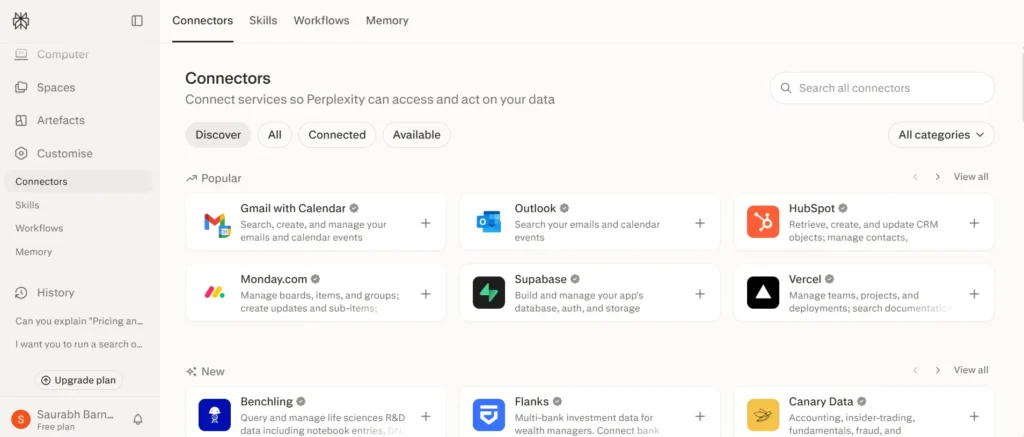
Instead of giving you a long list copied from Perplexity’s website, I want to focus only on the features I’ve actually used during the past year.
These are the ones that have genuinely become part of my workflow, so my opinions are based on real usage rather than a few minutes of testing:
1. Web Search
This is the feature I use almost every day.
Whenever I need the latest information about an AI tool, software update, pricing change, company announcement, or industry trends, I often use Perplexity.
Unlike traditional search engines, I don’t have to open ten different tabs and piece everything together myself. Instead, Perplexity searches the web, summarizes the information, and provides links to the sources it used.
This alone has saved me countless hours over the past year.
2. Deep Research
Deep Research has become one of my favorite additions to Perplexity.
Instead of generating a quick answer, it spends more time exploring multiple sources and produces a much more detailed report.
I don’t use it for every question because it naturally takes longer than a standard search, but whenever I’m researching an important topic for a blog post or trying to understand a complex subject, it’s incredibly useful.
I’ve found it especially valuable for AI tool comparisons, industry research or collecting information before writing long-form articles.
That said, I still verify the final information before publishing anything. Deep Research gives me an excellent starting point, but I don’t treat it as a replacement for my own research.
3. File Upload
I occasionally use the File Upload feature in Perplexity to analyze a document instead of searching the web.
I upload PDFs, reports, documentation, and research papers to:
- summarize lengthy documents
- find specific information
- explain technical content
- answer questions about uploaded files
The results have generally been good.
For shorter documents, it performs very well. For larger or more complex files, I prefer Claude or ChatGPT because I find its explanations slightly more detailed.
Still, having this feature built into the same platform is extremely convenient.
4. Writing Mode
Although Perplexity can generate content, I don’t use it as my primary writing assistant.
Instead, I mainly use Writing Mode to: draft outlines, improve clarity and sometimes creating quick summaries.
For serious writing projects, I still prefer ChatGPT or Claude because I find them better at producing natural, well-structured content.
Perplexity’s strength isn’t replacing dedicated writing assistants – it’s giving you accurate information that improves your writing.
5. Perplexity Personal Computer
I’ve experimented with Perplexity’s Personal Computer feature, and it’s one of the platform’s most interesting innovations.
Instead of simply answering questions, it can help complete tasks across websites and applications, making it feel more like an AI agent than a traditional chatbot.
While I haven’t used it daily, I’ve tested it for simple productivity tasks and found the overall experience promising.
As AI agents continue to evolve, I think this feature has enormous potential. Right now, I see it as an exciting glimpse of where AI assistants are heading rather than something I fully depend on.
6. Connectors
Connectors are another feature I’ve used occasionally, particularly when I want Perplexity to work with information beyond a standard web search.
The ability to connect external data sources makes the answers much more relevant in certain situations.
Although I don’t rely on Connectors every day, I can see them becoming incredibly valuable for professionals who regularly work with documents, cloud storage, or collaborative workspaces.
For my current workflow, they’re useful…but not essential.
7. Artefacts
Artefacts are one of the newer features I’ve explored, and I think they add a lot of value beyond simple text responses.
Instead of receiving only a chat answer, you can generate structured outputs such as documents, web pages, reports, code, or other editable content.
I’ve mainly used Artefacts while experimenting with content creation and structured outputs, and I appreciate having a dedicated workspace instead of a long chat conversation.
While I still use specialized tools for larger projects, Artefacts make it much easier to move from an idea to something tangible without leaving Perplexity.
It’s a feature I’ll likely use more as it continues to mature.
My Most-Used Features at a Glance
If you’re wondering which features have delivered the most value during my year with Perplexity AI, here’s my personal ranking:
| Feature | My Rating | How Often I Use It |
|---|---|---|
| Web Search | (10/10) | Every day |
| Deep Research | (9/10) | Very Frequently |
| File Upload | (8.5/10) | Occasionally |
| Personal Computer | (8.5/10) | Occasionally |
| Artefacts | (8.5/10) | Occasionally |
| Writing Mode | (8/10) | Sometimes |
| Connectors | (8/10) | Occasionally |
Overall, the features that keep me coming back to Perplexity aren’t the flashy ones – they’re the practical ones.
Web Search and Deep Research have become indispensable parts of my workflow because they consistently help me find accurate information faster.
The newer features like Personal Computer, Connectors, and Artefacts are promising, and while I don’t rely on them every day, they show that Perplexity is evolving beyond an AI search engine into a more capable productivity platform.
Real Examples
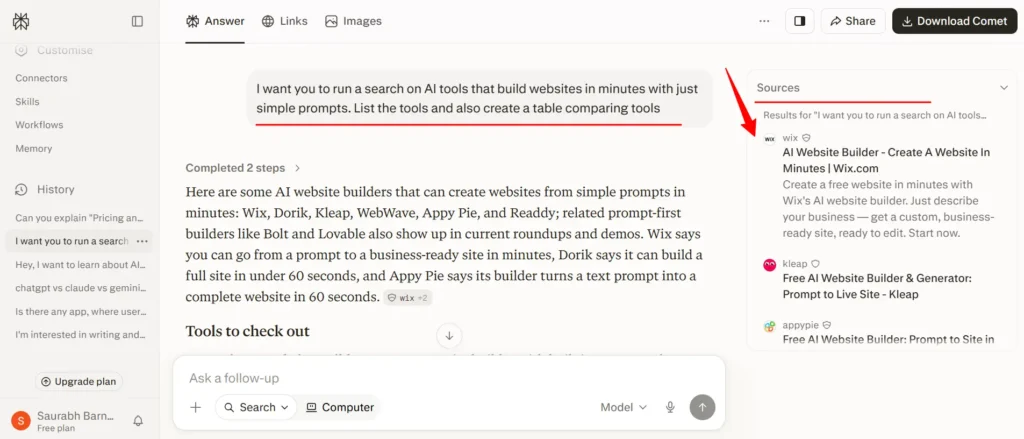
One of the best ways to judge an AI tool is to give it a real task – not a benchmark or a simple trivia question.
Since I regularly write about AI tools, I often need to discover products in a specific category. For this test, I gave Perplexity the following prompt:
“I want you to run a search on AI tools that build websites in minutes with just simple prompts. List the tools and also create a table comparing the tools.”
This is the kind of prompt I use in my day-to-day workflow because it combines research, discovery, and comparison into a single request.
What Perplexity did well:
The first thing that impressed me was how quickly it understood the task.
Instead of giving a generic explanation, Perplexity searched the web, identified multiple AI website builders, and generated a clean comparison table that included key information about each tool. It also cited the sources it used, allowing me to verify the information easily.
What I found particularly interesting was that Perplexity surfaced a few AI website builders that I hadn’t seen on the first page of Google Search. Those additional discoveries were genuinely useful because they helped me explore tools that might otherwise have been overlooked.
For research and brainstorming, that’s a significant advantage over simply browsing Google manually.
Where It fell short:
However, the results weren’t perfect.
Although Perplexity introduced some lesser-known tools, it also failed to include several well-known and actively maintained AI website builders that were clearly ranking on Google’s search results.
In other words, it wasn’t a complete picture.
This highlighted something I’ve noticed several times over the past year: Perplexity is excellent at discovering relevant information, but it shouldn’t be treated as an exhaustive search engine.
If I’m writing a comprehensive guide or comparison article, I still cross-check Google Search and official websites to ensure I haven’t missed any important products.
The comparison wasn’t complete initially:
The second part of my prompt asked Perplexity to compare the tools.
While it did create a comparison table, the initial comparison only included the tools it had already listed. Naturally, because some major tools were missing from the first response, they were also absent from the comparison.
Instead of starting over, I used a follow-up prompt asking Perplexity to compare additional AI website builders that weren’t included in the original answer.
This worked much better.
The follow-up conversation allowed Perplexity to expand the comparison and provide a more complete analysis without repeating the entire research process from scratch.
My takeaway:
This example perfectly summarizes my experience with Perplexity after one year.
It’s incredibly effective for speeding up research, discovering tools, organizing information, and creating a solid starting point. But when my goal is to create a comprehensive resource, I don’t rely on its first answer alone.
My workflow now usually looks like this:
- Start with Perplexity to gather information quickly.
- Review the suggested tools and sources.
- Cross-check Google Search to see if anything important is missing.
- Verify details on the official websites.
- Use follow-up prompts to fill any gaps or expand the comparison.
Used this way, Perplexity becomes an excellent research assistant rather than a replacement for thorough manual research…and that’s where I think it delivers the most value.
Pricing
Now, let’s discuss Perplexity AI pricing and plans:
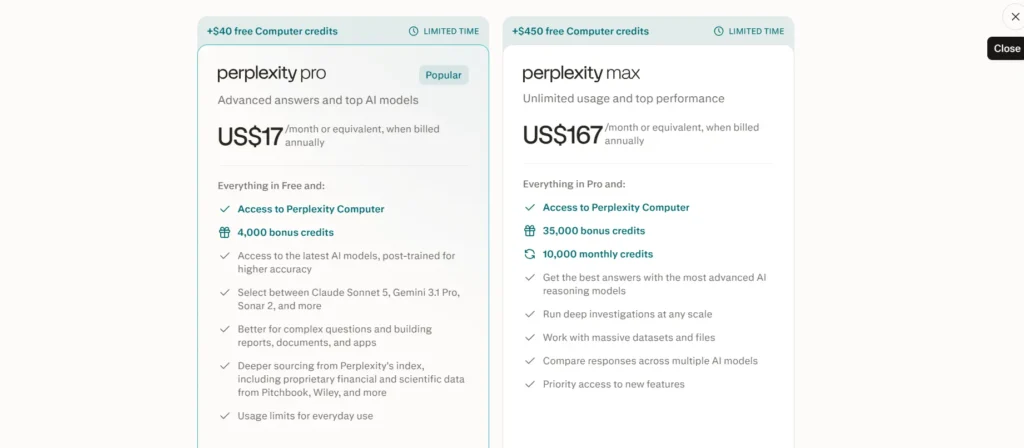
Perplexity AI currently has three main consumer plans: Free at $0/month, Pro at $17/month, and Max at $167/month on annual billings.
The higher tiers add more usage, access to more advanced models, deeper research, file and app support, and Perplexity’s computer/agent features.
Free
The Free plan is for light use and basic search. It includes cited answers, access to basic AI models, and limited daily usage.
Pro
Pro is the popular paid plan at $17/month. It adds access to 5+ latest AI models, Perplexity Computer, 4,000 bonus credits, extra usage-based credits you can buy, premium database searches, and stronger accuracy for serious work.
Max
Max is the top consumer tier at $167/month. It includes Perplexity Computer, 35,000 bonus credits, 10,000 monthly credits, the latest models with higher-accuracy post-training, and premium database access.
How to choose:
- free plan – if you only need occasional simple answers
- Pro – if you use Perplexity regularly for research, study, or work
- Max – if you need the highest limits and the most advanced features
Perplexity also notes that it has commercial and enterprise offerings beyond the consumer plans, and those are meant for teams and organizations rather than individual users.
Who Should Use Perplexity?
After using Perplexity AI for a year, I believe it’s best suited for people who spend a significant amount of time researching information online.
If you’re a student, researcher, blogger, marketer, journalist, developer, or business professional, Perplexity can dramatically reduce the time you spend searching, reading, and verifying information.
It’s especially valuable if you need up-to-date answers with source citations instead of just AI-generated responses.
However, if your primary goal is creative writing, long-form content generation, or complex reasoning, you’ll likely get better results from tools like ChatGPT or Claude. In my experience, Perplexity works best as a research assistant, not an all-in-one AI assistant.
Final Verdict
After using Perplexity AI almost every day for an entire year, I can confidently say it’s one of the most useful AI tools I’ve added to my workflow.
It has saved me countless hours researching AI tools, verifying facts, comparing products, and discovering reliable sources—all while reducing the need to open dozens of browser tabs.
That said, it’s not perfect. Hallucinations still happen, some sources aren’t always the most authoritative, and its first response may not always be as comprehensive as a thorough Google search.
That’s why I never rely on it blindly. Instead, I use it to accelerate my research and then verify important information before publishing.
Would I continue using Perplexity?
Absolutely. For anyone whose work depends on finding accurate, up-to-date information quickly, it’s one of the best AI-powered research assistants available today.
Just don’t expect it to replace Google, ChatGPT, or your own judgment. The real value comes from using it alongside those tools, not instead of them.
FAQs
Is Perplexity AI free?
Yes. Perplexity offers a generous free plan with access to AI-powered search, source citations, and basic research features. A Pro subscription unlocks more advanced capabilities, higher usage limits, and premium AI models.
Is Perplexity better than ChatGPT?
It depends on your use case. I prefer Perplexity for web research, current information, and source citations, while ChatGPT is better for writing, brainstorming, coding, and complex reasoning. I use both together rather than choosing one over the other.
Is Perplexity accurate?
Generally, yes—but not always. In my experience, it’s more reliable than many AI chatbots because it cites its sources. However, hallucinations can still happen, so I always verify important information before publishing.
Is Perplexity worth paying for?
If your work involves frequent research, writing, learning, or fact-checking, I’d say yes. The time it saves easily justifies the subscription for heavy users. Casual users, however, may find the free plan more than sufficient.
Is Perplexity safe?
Yes, Perplexity is generally safe to use. However, like any AI platform, you should avoid uploading sensitive personal, financial, or confidential business information unless you’re comfortable with the platform’s privacy practices.