I have been using ChatGPT since it first launched in late 2022, and it has improved tremendously over the years.
From releasing more capable models and introducing new features to integrating apps, enabling automation, and much more, ChatGPT has come a long way.
If you want to explore ChatGPT in depth and understand everything it offers – from basic writing assistance to workflow automation, pricing, pros and cons, and whether it’s actually worth using – this article is worth your time.
Quick Overview of ChatGPT:
ChatGPT is one of the most popular AI assistants available today.
You’ll be surprised to know that it was the first consumer app to hit 100 million users in just two months, and surpassed one billion monthly active users.
Developed by OpenAI, it can help you write content, answer questions, summarize documents, generate images, analyze files, brainstorm ideas, code, and automate repetitive tasks – all from a single interface.
It started as a simple AI chatbot in 2022…now has evolved into a complete AI productivity platform. Whether you’re a student, creator, freelancer, developer, marketer, or business owner, ChatGPT can help you save time and improve your work in many ways.
And, it’s available on the web, desktop, and mobile devices, you can easy access it with any devices.
Who is ChatGPT Best for:
Now, let’s talk about who is ChatGPT best for…
1. Content Writers and Bloggers
ChatGPT helps writers create blog posts, articles, outlines, headlines, social media content, and email newsletters much faster. It can also improve grammar, rewrite content, and generate fresh ideas when you’re stuck.
2. Students and Researchers
Students can use ChatGPT to understand complex topics, summarize study material, create notes, prepare for exams, and brainstorm project ideas. It also helps simplify difficult concepts into easy-to-understand language.
3. Developers and Programmers
ChatGPT can also help developers by writing code, explaining programming concepts, fixing bugs, reviewing code, and generating documentation. It supports many popular programming languages, making development faster and more efficient.
4. Marketers and SEO Professionals
Marketers can use ChatGPT to create ad copy, email campaigns, social media posts, product descriptions, and SEO-friendly articles. It can also help with keyword ideas, content planning, and competitor research.
5. Business Owners and Entrepreneurs
Business owners can use ChatGPT to write business documents, create marketing strategies, generate sales copy, analyze ideas, and automate repetitive tasks. It acts like a virtual assistant that helps improve productivity.
6. Designers and Creative Professionals
Designers can brainstorm creative concepts, generate image prompts, write design briefs, create marketing content, and receive feedback on ideas. ChatGPT also works well alongside AI image generation tools for creative projects.
7. Customer Support Teams
Support teams can use ChatGPT to draft customer replies, create FAQs, write help center articles, and respond to common customer questions quickly while maintaining a consistent tone.
8. Anyone Looking to Automate Everyday Work
If you spend time on repetitive tasks like writing emails, summarizing documents, organizing information, planning projects, or creating reports, ChatGPT can help automate much of that work and help you save hours every week.
Features
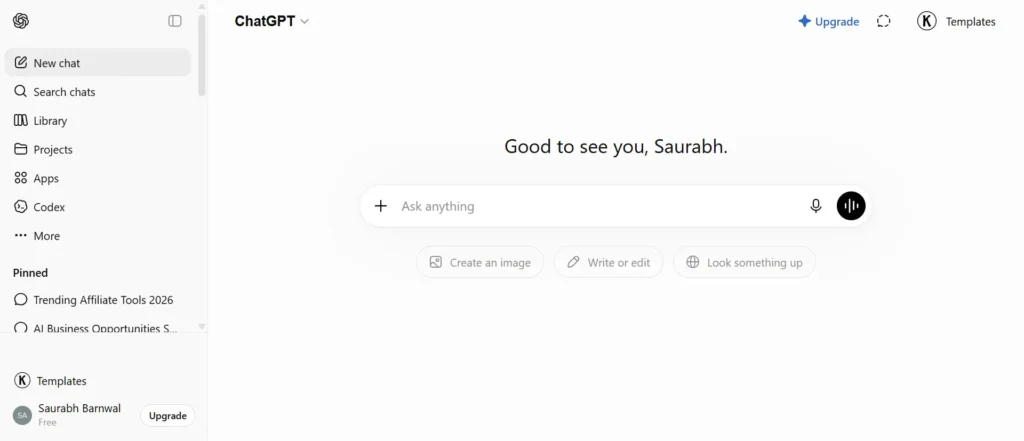
One of the biggest reasons behind ChatGPT’s popularity is the number of features it offers.
Instead of focusing on just one task, it combines multiple AI capabilities into a single platform. Let’s discuss the main features:
AI Writing Assistant
If you’re into writing or need to write anything, ChatGPT can help you write articles, emails, social media posts, product descriptions, ad copy, scripts, and much more.
It can also rewrite content, improve grammar, change tone, summarize long text, and translate between multiple languages.
Research and Learning
Instead of spending hours searching through different websites, you can ask ChatGPT to explain topics in simple language.
It can summarize research papers, create study notes, answer questions, and even help prepare for interviews and exams.
However, it’s also important to note that all the information provided by it…are not always correct…sometimes it may hallucinate, sometimes it may be biased also…depending on the training data that feed on.
Coding Assistant
If you’re learning coding or already a developers, you can use ChatGPT to write code, explain programming concepts, debug errors, and build applications faster.
The best? It supports in almost all popular programming languages including Python, JavaScript, Java, C++, SQL, and more…whatever your interest is.
Image Generation
If you want to transform your imagination or any any idea into a visual like image, ChatGPT can also help you with that.
Just enter the text prompts…and your image will be generated in minutes.
Whether you need blog illustrations, social media graphics, marketing visuals, logos, or concept art, you can create them without switching to another tool.
File Analysis
Upload PDFs, Word documents, spreadsheets, presentations, images…with messy data, and ChatGPT can help you summarize documents, extract information, analyze data, answer questions about uploaded files, and generate reports as per your needs.
Voice Conversations
Hate typing? Instead of typing, you can simply talk with ChatGPT using voice mode.
This makes brainstorming, language learning, and everyday conversations feel much more natural. Not just you learn the information faster, but can also improve your speaking.
Deep Research
For complex topics, ChatGPT can perform detailed research by gathering information from multiple online sources.
This feature saves hours of manual research and provides organized results with references.
Custom GPTs
This is my favorite one – you can also create your own AI assistants for specific tasks without writing a single line of code.
For example, you can build a blogging assistant, coding tutor, sales assistant, resume reviewer, or customer support bot that can do the work which usually require humans employment or sometimes a team.
Projects and Organization
Projects help you organize chats, files, and instructions related to a specific task.
This is useful when you’re working on long-term projects like writing a book, managing a business, or creating content.
Automation
ChatGPT can automate many repetitive tasks, helping you save time and work more efficiently. For example, it can summarize documents, generate emails, create reports, organize data, and turn one piece of content into multiple formats.
When connected with other apps and automation tools, ChatGPT can also streamline workflows, reducing manual work for individuals and businesses. This reduces manual work and allows you to complete tasks much faster.
Pros and Cons
Like every AI tool, ChatGPT has both strengths and limitations. While it is one of the most capable AI assistants available today, it’s important to understand where it excels and where it still has room for improvement.
Pros
- Easy to use for beginners: ChatGPT has a simple and intuitive interface, making it easy for anyone to get started without technical knowledge.
- Excellent writing and editing capabilities: It can write, rewrite, summarize, proofread, and improve almost any type of content, from emails to long-form articles.
- Supports image generation and file analysis: You can create AI-generated images from text prompts and upload documents, spreadsheets, PDFs, or images for analysis and insights.
- Strong coding assistance: ChatGPT helps developers write code, debug errors, explain programming concepts, and learn new languages more efficiently.
- Available on web, desktop, and mobile: You can access ChatGPT across multiple devices, allowing you to work from anywhere.
- Regularly updated with new models and features: OpenAI frequently improves ChatGPT by introducing more capable AI models, new tools, and productivity features.
- Free plan available: You can start using ChatGPT for free…it’s accessible to everyone…students, professionals, and casual users.
Cons
- Some advanced features require a paid plan: Premium tools like higher usage limits and certain advanced capabilities are only available with paid subscriptions.
- AI responses may occasionally contain mistakes: While generally reliable, ChatGPT can sometimes provide inaccurate or outdated information, so important facts should always be verified.
- Internet-based research depends on available sources: The quality of research results depends on the information ChatGPT can access, and some niche topics may have limited coverage.
- Very large or highly specialized tasks may still require human review: Complex legal, medical, financial, or technical work should be reviewed by an expert to ensure accuracy.
Pricing
ChatGPT offers multiple pricing options depending on your needs.
The Free plan is enough for casual users who want basic AI assistance.
The Plus plan unlocks more powerful AI models, higher usage limits, faster responses, image generation, advanced research tools, and additional premium features.
Here’s a simple, friendly breakdown of ChatGPT’s pricing you can drop into your blog post:
Free Plan
This is where most people start. You get access to a decent model (GPT-5.3), but message limits are tight – around 10 messages every 5 hours. In the US, you’ll also see the occasional “Sponsored” ad below responses now. Great for casual use, but you’ll hit the ceiling fast if you use it daily.
Go Plan – $8/month (INR 399)
The budget-friendly option that launched globally earlier this year. You get about 10x more messages than Free, plus file uploads and image creation. The catch? Ads still show up, and you don’t get the flagship model or the fancier features like Deep Research or Agent Mode.
Plus Plan – $20/month (INR 1,999)
This has been $20 since ChatGPT Plus launched, and it’s arguably a better deal now than ever since features keep getting added. You get the full model lineup, no ads, Deep Research (a limited number of runs per month), Sora video generation, the Codex coding assistant, and Agent Mode.
Pro Plan – $100 or $200/month (INR 10,699/month)
Built for heavy users. Both tiers give you the top-tier model and a bigger context window, but the $200 plan gives roughly 4x the usage allowance of the $100 one (things like Deep Research runs and Codex usage). Most people who used to need the $200 plan can now get away with the cheaper $100 one.
Business – around $25–30/user/month (INR 1,800)
Aimed at teams — adds admin controls, security certifications (like SOC 2), single sign-on, and a bunch of app integrations.
Enterprise (custom pricing)
For large organizations. Pricing isn’t public – you talk to OpenAI’s sales team – but it adds things like advanced compliance features, data residency options, and dedicated support.
Which Plan Should You Choose?
If you’re completely new to ChatGPT, start with the Free plan.
If you use AI every day for work, blogging, programming, or business, the Plus plan offers the best balance between features and price.
The Team and Enterprise plans are mainly intended for organizations that need collaboration, user management, and enterprise-level security.
Best Use Cases of ChatGPT
ChatGPT works well across many different industries and tasks.
Some of the most popular use cases include writing blog posts, creating marketing content, generating emails, coding, learning new skills, analyzing documents, brainstorming business ideas, preparing presentations, creating images, and automating repetitive work.
Many freelancers and small business owners also use ChatGPT as an affordable productivity assistant to save time every day.
Alternatives of ChatGPT
Although ChatGPT is one of the strongest AI assistants available today, several alternatives are worth considering depending on your needs.
Google Gemini is a good choice if you work heavily with Google’s ecosystem.
Claude is popular for long-form writing, document analysis, and thoughtful responses.
Microsoft Copilot works well for users who spend most of their time inside Microsoft 365 applications.
Perplexity AI is better suited for research-focused tasks because it provides answers with source citations.
If your work depends on coding, tools like GitHub Copilot can also be excellent companions alongside ChatGPT.
Final Verdict – Is ChatGPT Worth It?
ChatGPT has grown far beyond being just an AI chatbot. It has become a complete AI assistant that can help with writing, coding, research, image generation, file analysis, learning, and automation.
The free plan is powerful enough for most beginners, while the paid plans offer advanced features that professionals and businesses can benefit from.
If you’re looking for one AI tool that can handle a wide variety of everyday tasks, ChatGPT is easily one of the best choices available in 2026.
Now It’s your turn:
Got questions about ChatGPT and others, let me know in the comments. If you’re using any other AI chatbots than ChatGPT, feel free to share your experience 🙂